Thinking through how to detect GDPR territories from an iOS app
A look at the options for deciding, inside the app, whether the user is in an EEA member state.
- Published
This article is also published elsewhere. https://qiita.com/iganin/items/11318a0f021e0204e41f
Originally written in Japanese. This is a translation of the same piece.
Introduction
Background
As of 25 May 2018, the GDPR — the EU General Data Protection Regulation came into force as a regulation on personal data protection, covering the EEA member states. Many of you will know it from the notices various apps have been sending — there has been a wave of privacy policy revisions recently.
Handling this regulation presumably requires work at every layer, server and database included. In this article I want to think through how best to decide, inside an iOS app, whether the user is currently in a covered country.
Caveats
- The views here are my own personal ones and contain nothing that represents the official position of any organisation I belong to
- I am not a lawyer, so the legal interpretation may contain errors
For legal interpretation and the specifics of compliance, the references below are the better source:
- JETRO feature - On the EU General Data Protection Regulation (GDPR) (Japanese)
- Personal Information Protection Commission - GDPR (Japanese)
- European Union
Environment
- Xcode 9.3
- Firebase iOS SDK 4.9.0
- Firebase RemoteConfig
The goal
The goal for this article is:
- Detect GDPR territories inside the app
Concretely: determine whether the user is, at the time they use the app, in one of the GDPR territories (the 31 EEA member states). “At the time they use the app” matters because of this passage in the regulation:
The personal data covered by the GDPR is personal data relating to individuals present within the European Economic Area (EEA), comprising 31 countries including the EU member states (GDPR Article 2). Regardless of nationality or place of residence, this includes information about business travellers and tourists staying in the EEA for short periods.
So even for a user holding Japanese nationality, if they travel to an EEA member state, their information during that trip can fall under the GDPR.
Approach 1: using the time zone
Deciding based on the app’s time zone. If the user has not fixed a specific country in the iOS Settings app and has it set to automatic, the appropriate time zone can be obtained from the current location, so the decision can be made without any lag. The drawback is that if the user has pinned the time zone, the current location is not reflected correctly.
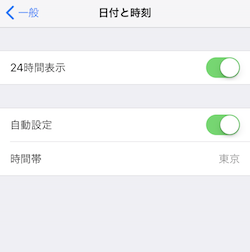
The current time zone can be obtained like this:
let currentTimeZone = TimeZone.current.identifierGiven that countries may be added to or removed from the list in future, it seems better not to hold the list of covered countries solely inside the app, but to make it possible to add and remove entries from outside. For instance, you could build a list of the covered countries’ time zones in Firebase RemoteConfig, turn it into an array in the app, and decide based on whether the current time zone is in that list.
A method like the following should do it:
// Fetch the covered countries' time zone string from RemoteConfig and turn it into an array.
// This assumes, for instance, that the time zones are configured comma-separated.
// The RemoteConfig fetching itself is omitted here — see the references.
let targetCountryTineZones = targetCountryTineZonesString.components(separatedBy: ",")

if isGDPRTargetCountry(targetCountryTimeZones: targetCountryTineZones) {
    // Handling for GDPR territories
}

func isGDPRTargetCountry(targetCountryTimeZones: [String]) -> Bool {
    let currentTimeZone = TimeZone.current.identifier
    return targetCountryTimeZones.contains(currentTimeZone)
}
As an aside, the list of time zones defined by iOS can be obtained with:
TimeZone.knownTimeZoneIdentifiersApproach 2: using the geocoder
This one is available if your app already obtains latitude and longitude. When you have those, iOS’s
CLGeocoder gives you the country code like this. (The sample fetches the two-letter country code — JP for
Japan, for example.)
Because fetching the country code is asynchronous, though, when and how you fetch it needs some thought.
One option would be to fetch the country code at app launch, save it to UserDefaults, and use the saved
value when making the decision.
final class GeoCoderWrapper {
    static private var countryCode: String? {
        get { return UserDefaults.standard.string(forKey: #function) }
        set { UserDefaults.standard.set(newValue, forKey: #function) }
    }

    // Get the country code from the latitude/longitude and save it to UserDefaults.
    // location is assumed to have been obtained via CLLocationManager.
    static func updateCountryCode(location: CLLocation) {
        let geoCoder = CLGeocoder()
        geoCoder.reverseGeocodeLocation(location) { (placeMarks, error) in
            // Several placeMarks come back, so take the first
            GeoCoderWrapper.lastISOCountryCode = placeMarks?.first?.isoCountryCode
        }
    }
}
As with the time zone approach, you build the list of covered countries in Firebase or on the server, and decide based on whether the country code is in that list.
func isGDPRTargetCountry(targetCountryCodes: [String]) -> Bool {
    guard let currentCountryCode = GeoCoderWrapper.countryCode else { return true }
    return targetCountryCodes.contains(currentCountryCode)
}
The list of country codes for the 31 covered countries looks like this:
LI,IS,NO,AT,BE,BG,HR,CY,CZ,DK,EE,FI,FR,DE,GR,HU,IE,IT,LV,LT,LU,MT,NL,PL,PT,RO,SK,SI,ES,SE,GBAn aside
Firebase conditions (region, language)
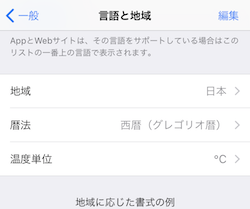
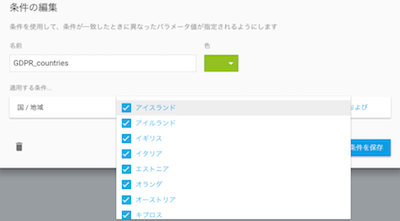
When configuring Firebase RemoteConfig, you can set conditions on a property and return different values per condition. However, the relevant Firebase property was deciding based on the region and language in the Settings app. Region and language settings do not change unless the user explicitly changes them. So even if someone travels from Japan into the EU, the region and language stay the same, they are not recognised as subject to GDPR handling, and the requirement is not met.
Being able to narrow the audience intuitively in the Firebase console had seemed appealing, but this approach looks unusable.
Closing
The GDPR’s penalties are severe — 4% of annual turnover or 20 million euros, whichever is higher — so for apps serving the eurozone I consider this mandatory work. I hope the information here is useful to someone. If you know of other approaches, I would be glad to hear them in the comments.