Things to watch when combining GraphQL and Sentry in React
Every GraphQL request is a POST to the same URL, so Sentry cannot tell them apart. How apollo-link-sentry fixes that, and what to be careful about in how much it reports.
- Published
This article is also published elsewhere. https://iganin.hatenablog.com/entry/2021/05/26/230514
Originally written in Japanese. This is a translation of the same piece.
TL;DR
- Every GraphQL request goes to the same URL
- On a network error, Sentry sees only that one URL, so you cannot tell which operation it was
- Bring in an external OSS library (apollo-link-sentry) so you can see inside the GraphQL request
The problem
GraphQL requests are, in essence, all POST requests to the same URL. (You can deliberately switch to GET in some cases, I believe.) When Sentry catches a network error, everything collapses onto that single URL, and working out the cause takes far longer than it should.
![A log in Sentry showing only POST http://localhost:4000 [400], with no indication of which operation it was](/articles/react-graphql-sentry/network-error-without-operation.png)
Image source: apollo-link-sentry
The fix
There is a library that solves exactly this: apollo-link-sentry.
DiederikvandenB/apollo-link-sentry - GitHub
With it installed, the request error above is displayed like this, showing the query’s operation and the error contents. For installation details, the GitHub README is the place to look.
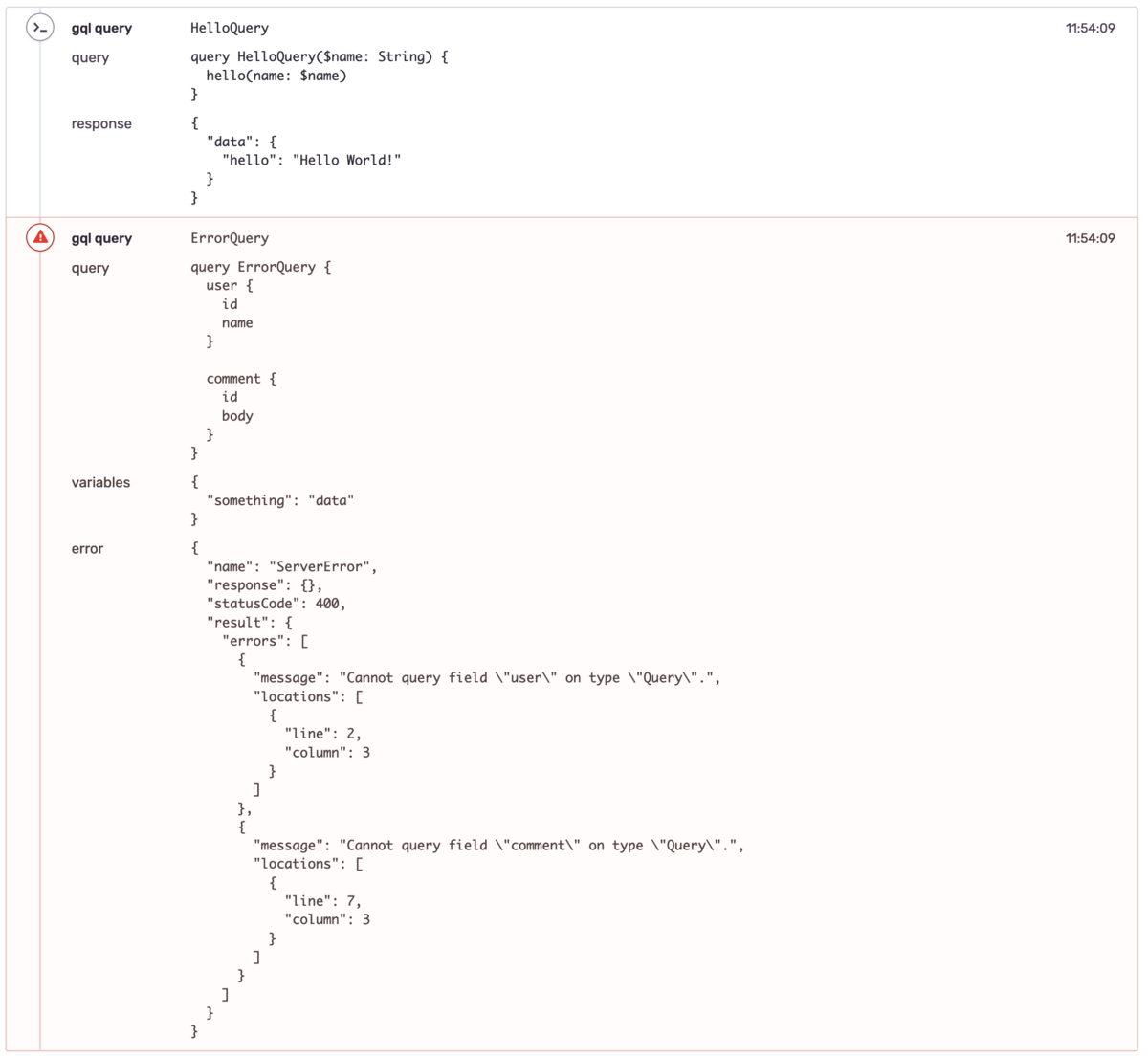
Image source: apollo-link-sentry
What to be careful about
The thing to be careful about is how much information you report.
If you have reporting on transactions enabled, logs reach Sentry for more than just errors. And if you also report normal response bodies, personal data can end up in Sentry — very bad from a security standpoint, and depending on the case it can run into GDPR as well.
apollo-link-sentry lets you configure what gets reported at initialisation time, so narrow it down there.
new SentryLink(/* See options */);options.ts in apollo-link-sentry
Something like the settings below seems reasonable. Variables can carry personal data depending on the case, so leave them out and report only the query and the error. That keeps the chance of personal data appearing down.
const sentryLink = new SentryLink({
  uri: URL,
  setTransaction: true,
  setFingerprint: true,
  attachBreadcrumbs: {
    includeQuery: true,
    includeVariables: false,
    includeFetchResult: false,
    includeError: true,
    includeCache: false,
  },
});
That said, it does not hold if you are putting personal data into the errors themselves. In that case you
would want to use transform in the options to strip the relevant output before it is sent to Sentry.
Notes
I used React as the example here, but the same should apply to Swift, Kotlin and others. Whenever you combine GraphQL with error monitoring, you are going to need some arrangement that gets the contents of the request reported.
Note: if no library exists for your platform, you will likely have to build the handling yourself — attach the GraphQL request contents to Sentry’s breadcrumbs before sending — and hook it into the client’s link.